Deploying a text-to-SQL agent with private VPC access to RDS PostgreSQL on Amazon Bedrock AgentCore
1. Overview
Text-to-SQL translates natural language queries into structured SQL statements, allowing users without specialized database knowledge to interactively explore and analyze data - beyond the pre-configured queries of static dashboards and reports, and without depending on technical teams to write and run custom queries.
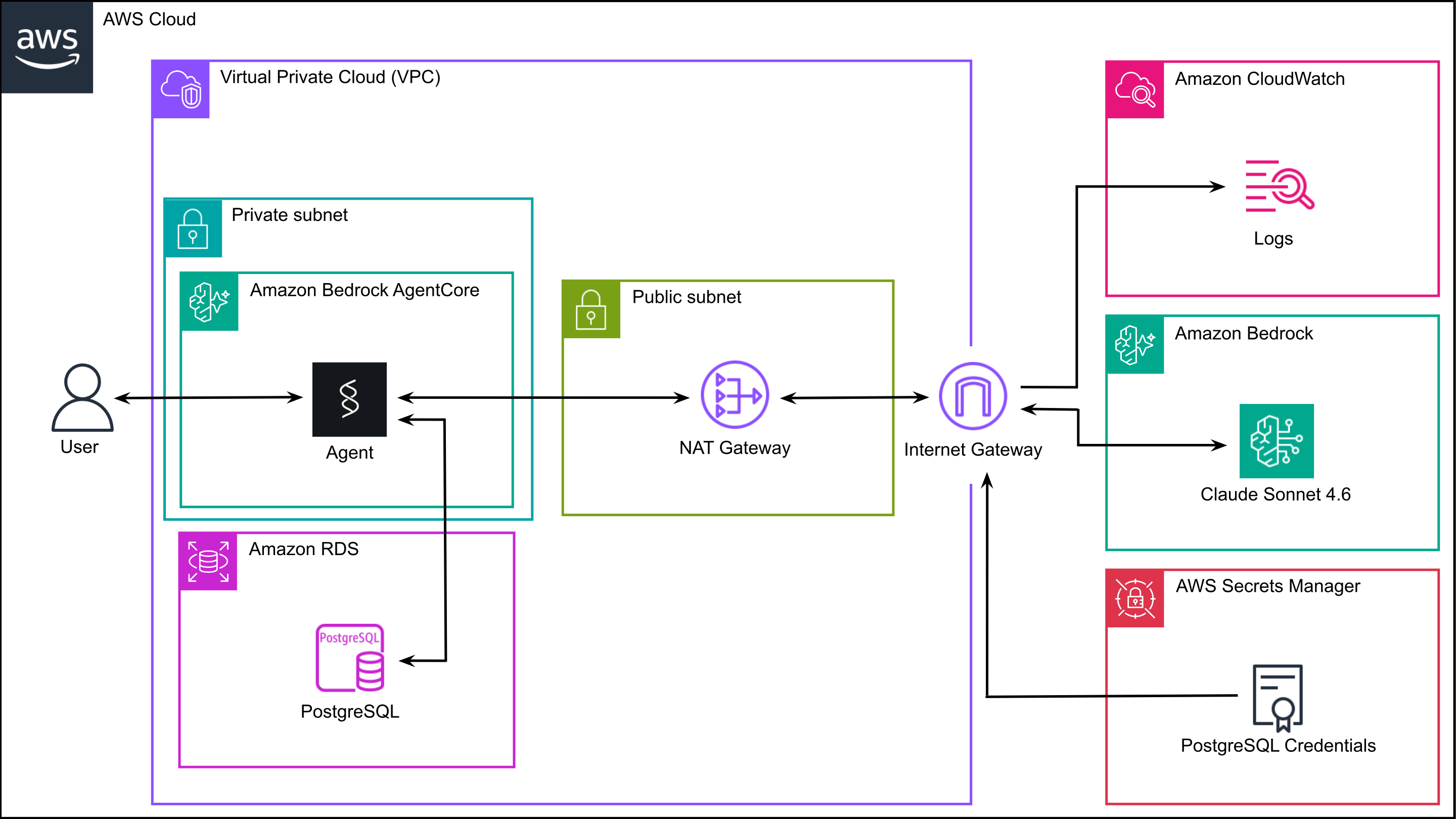
In this post, we build a text-to-SQL agent using Strands Agents and deploy it to Amazon Bedrock AgentCore Runtime in a private VPC. The agent accesses an Amazon RDS PostgreSQL instance in the same VPC via an MCP server and communicates with other AWS services through a NAT Gateway.
The agent translates user questions into SQL queries, executes them against the database, and explains the results in natural language. Unlike RAG-based approaches that require re-syncing the knowledge base whenever the schema or data changes, the agent queries directly the live database, automatically incorporating any changes without manual intervention.
2. Solution
The solution involves creating an RDS PostgreSQL database, updating the default VPC configuration, building the agent in Python with Strands Agents, containerizing it with Docker, pushing the image to Amazon ECR, and deploying it to Amazon Bedrock AgentCore Runtime. The implementation consists of three files:
agent/
├── agent.py              # Strands agent with database tools
├── Dockerfile            # Container image definition
└── build_and_deploy.sh   # ECR image creation and AgentCore Runtime deployment
To follow along, you will need an AWS account with sufficient IAM permissions to create and manage the resources described in this post, the AWS CLI installed and configured with appropriate credentials, Docker for building and pushing the container image, and Python 3.13 with uv for project setup and dependency management.
2.1 Create the PostgreSQL database in RDS
For this demonstration, we use two small tables: products and sales,
containing product names and unit sales for three items.
We create the two tables in a PostgreSQL RDS instance with public access disabled and store the database credentials in AWS Secrets Manager.
The instance runs within the default VPC, which has three public subnets, an internet gateway, and DNS resolution and DNS hostnames enabled.
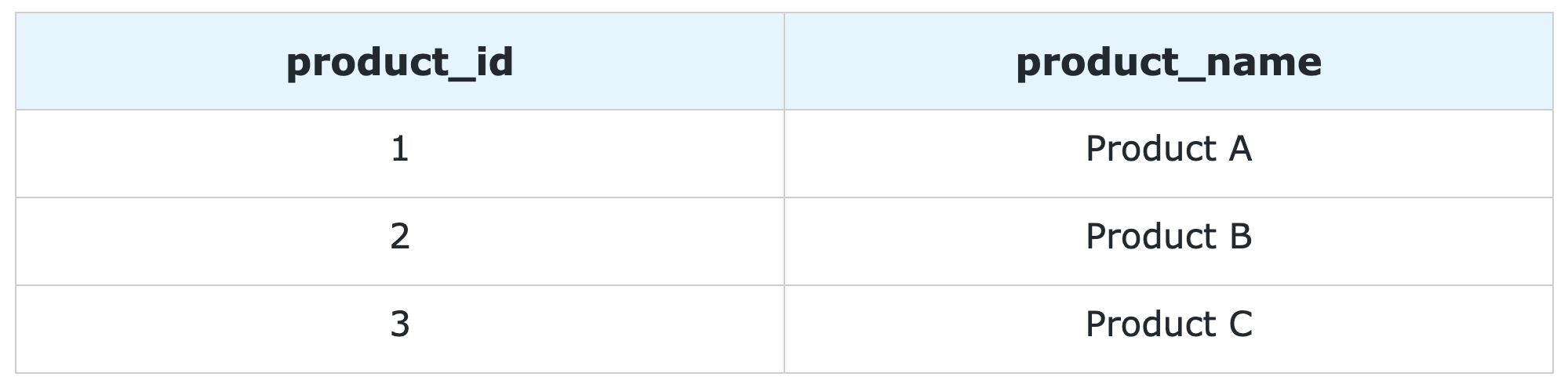
Figure 1:
products
PostgreSQL table.
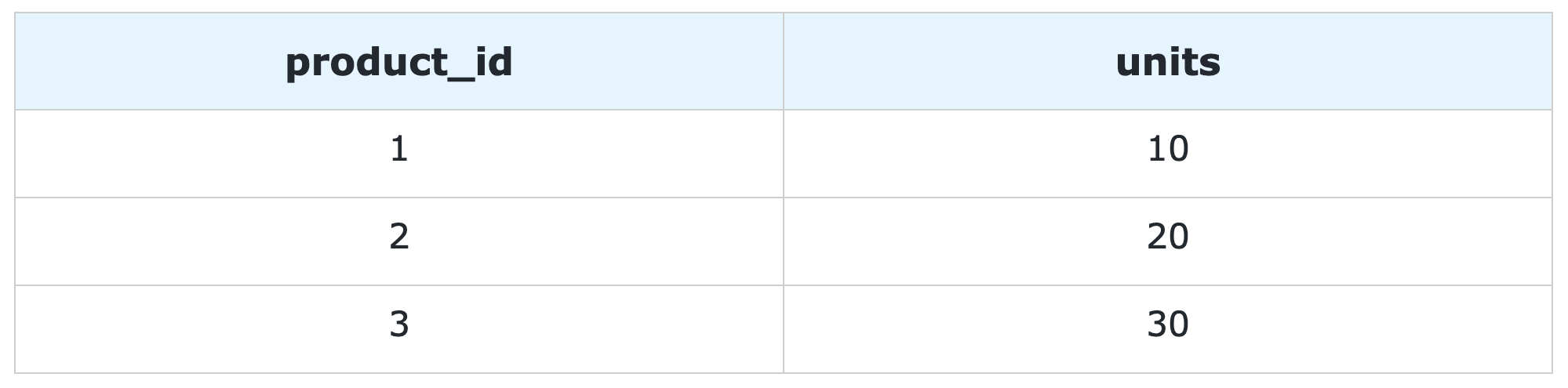
Figure 2:
sales
PostgreSQL table.
2.2 Update the default VPC configuration
To allow the agent to reach other AWS services such as Amazon Bedrock, AWS Secrets Manager and Amazon CloudWatch, we create a private subnet in the default VPC where the RDS instance is running. Since resources in a private subnet have no public IP and cannot reach the internet directly, we place a NAT Gateway in one of the existing public subnets with an Elastic IP. We then create a route table that sends all outbound traffic to the NAT Gateway and associate it with the private subnet. This gives the agent outbound internet access through the NAT Gateway while keeping it on the same private network as the RDS database. Multiple private subnets across different AZs could additionally be set up to improve agent availability. For more details on the VPC configuration, see this article in the AWS Builders Center.
2.3 Build the agent with Strands Agents
The agent connects to the database with the postgres-mcp server, which includes tools for listing schemas, describing tables and running SQL queries. The agent retrieves the database user and password from AWS Secrets Manager. The secret ID, the database host, and the database name are passed as environment variables to the AgentCore Runtime by the deployment script in the next section.
We configure the postgres-mcp server to run as a subprocess via uv. The database URI, including the SSL certificate path for secure connections to RDS, is passed to the subprocess as an environment variable. The MCP client communicates with the server over standard input/output.
We start the client at module level and keep it alive for the lifetime of the session.
Important
By default, the postgres-mcp server runs in unrestricted access mode, allowing both read and write access to the database. For production use, set the access mode to restricted to limit the agent to read-only queries.
The agent is initialized with Claude Sonnet 4.6 as the underlying model, the postgres-mcp tools, and a system prompt.
The agent is wrapped in a BedrockAgentCoreApp with an async streaming entrypoint that yields agent events — including not only text responses, but also tool call inputs and results — back to the caller. The agent.py script is shown below.
import os
import json
import boto3
from strands import Agent
from strands.tools.mcp import MCPClient
from mcp.client.stdio import stdio_client, StdioServerParameters
from bedrock_agentcore.runtime import BedrockAgentCoreApp

# Create a Secrets Manager client and retrieve the database credentials
client = boto3.client("secretsmanager")
secret = client.get_secret_value(SecretId=os.environ["SECRET_ID"])

# Parse the secret string and extract the connection details
secret_string = json.loads(secret["SecretString"])
db_config = {
    "user": secret_string["username"],
    "password": secret_string["password"],
    "host": os.environ["DB_HOST"],
    "name": os.environ["DB_NAME"],
}

def create_postgres_client():
    # Configure the postgres-mcp server to run as a subprocess via uv
    server_params = StdioServerParameters(
        command="uv",
        args=["run", "postgres-mcp"],
        env={"DATABASE_URI": f"postgresql://{db_config['user']}:{db_config['password']}@{db_config['host']}/{db_config['name']}?sslmode=verify-full&sslrootcert=/app/global-bundle.pem"}
    )
    # Return an MCP client that communicates with the server over stdio
    return MCPClient(lambda: stdio_client(server_params))

# Start the MCP client and keep it alive for the lifetime of the session
postgres_client = create_postgres_client()
postgres_client.__enter__()

# Retrieve the list of tools exposed by the postgres-mcp server
tools = postgres_client.list_tools_sync()

# Initialize the Strands agent with the postgres tools
agent = Agent(
    model="eu.anthropic.claude-sonnet-4-6",
    tools=tools,
    system_prompt=(
        "You are a text-to-SQL assistant with access to a PostgreSQL database. "
        "When answering questions, always inspect the database schema first to understand the available tables and columns. "
        "Generate accurate SQL queries based on the user's question and the actual schema. "
        "Return the query results in a clear, readable format. "
        "If a question cannot be answered from the available data, say so explicitly."
    )
)

# Create the AgentCore app
app = BedrockAgentCoreApp()

# Define the async streaming entrypoint
@app.entrypoint
async def invoke(payload: dict):
    # Stream agent events including text chunks, tool use, and results
    stream = agent.stream_async(payload.get("prompt", ""))
    async for event in stream:
        yield event

# Run the AgentCore app
if __name__ == "__main__":
    app.run()
We deploy the agent using Docker. The Dockerfile uses uv’s ARM64 Python 3.13 base image. We copy the pyproject.toml and uv.lock files and install the dependencies, then download the RDS CA certificate bundle required for SSL connections to PostgreSQL. Finally, we copy the agent code, expose port 8080 and run the application. The pyproject.toml and uv.lock files referenced in the Dockerfile are generated by the deployment script in the next section. The Dockerfile is shown below.
# Use uv's ARM64 Python 3.13 base image
FROM --platform=linux/arm64 ghcr.io/astral-sh/uv:python3.13-bookworm-slim

# Set the working directory inside the container
WORKDIR /app

# Copy uv files
COPY pyproject.toml uv.lock ./

# Install dependencies
RUN uv sync --frozen --no-cache

# Download the RDS CA certificate bundle for SSL connections to PostgreSQL
RUN apt-get update && apt-get install -y wget && \
    wget -O /app/global-bundle.pem https://truststore.pki.rds.amazonaws.com/global/global-bundle.pem && \
    apt-get remove -y wget && rm -rf /var/lib/apt/lists/*

# Copy Python modules
COPY agent.py ./

# Expose port
EXPOSE 8080

# Run application
CMD ["uv", "run", "python", "agent.py"]
2.4 Deploy the agent to Amazon Bedrock AgentCore
The deployment script initializes a uv project and adds the required dependencies.
This generates the pyproject.toml and uv.lock files used by the Dockerfile.
It then authenticates with Amazon ECR, creates a repository and builds and pushes the container image.
Finally, it deploys the agent to AgentCore Runtime in VPC mode, specifying the private subnet and security group for network configuration.
The ID of the secret with the database user and password, the database host, and the database name are passed as environment variables and retrieved at runtime. The build_and_deploy.sh script is shown below.
# AWS account ID
aws_account_id="<aws-account-id>"

# AWS region for all resources
region="<aws-region>"

# AgentCore Runtime name
agent_name="<agentcore-runtime-name>"

# ECR repository name for the container image
repository_name="<ecr-repository-name>"

# Secrets Manager secret ID for RDS credentials
secret_id="<secret-name>"

# RDS instance endpoint
db_host="<rds-db-host>"

# RDS database name
db_name="<rds-db-name>"

# IAM execution role for AgentCore Runtime
role_name="<agentcore-runtime-role>"

# Private subnet (routes through NAT Gateway for outbound internet access)
subnet_id="<private-subnet-id>"

# Security group (allows HTTPS outbound for AWS API calls and inbound from RDS)
security_group_id="<vpc-security-group>"

# Project setup
uv init --name postgres-agent --description "Strands Agent for Postgres Text-to-SQL" --python 3.13 --bare
uv lock
uv add strands-agents fastmcp postgres-mcp boto3 bedrock-agentcore

# ECR login and repository creation
aws ecr get-login-password --region $region | docker login --username AWS --password-stdin $aws_account_id.dkr.ecr.$region.amazonaws.com
aws ecr create-repository --repository-name $repository_name --region $region

# Build and push container image
docker buildx build --platform linux/arm64 -t $aws_account_id.dkr.ecr.$region.amazonaws.com/$repository_name:latest --push .

# Deploy AgentCore Runtime
aws bedrock-agentcore-control create-agent-runtime \
  --agent-runtime-name "$agent_name" \
  --agent-runtime-artifact "{
    \"containerConfiguration\": {
      \"containerUri\": \"${aws_account_id}.dkr.ecr.${region}.amazonaws.com/${repository_name}:latest\"
    }
  }" \
  --network-configuration "{
    \"networkMode\": \"VPC\",
    \"networkModeConfig\": {
      \"subnets\": [\"${subnet_id}\"],
      \"securityGroups\": [\"${security_group_id}\"]
    }
  }" \
  --environment-variables "SECRET_ID=${secret_id},DB_HOST=${db_host},DB_NAME=${db_name}" \
  --role-arn "arn:aws:iam::${aws_account_id}:role/${role_name}" \
  --region "$region"
2.5 Test the agent in a Jupyter Notebook
After the agent has been deployed, we test it in a Jupyter Notebook. We invoke the agent over four conversational turns, demonstrating schema discovery, short-term memory, and a multi-table query. To avoid ongoing charges, delete the AgentCore runtime, ECR repository, RDS instance, NAT Gateway, Elastic IP, private subnet and route table after testing.
We start by importing the required libraries: boto3 to invoke the agent on Bedrock AgentCore,
json to serialize the request payload and deserialize the response, uuid to generate unique session
identifiers, and IPython.display to render the agent’s responses as formatted Markdown in the notebook.
# Import the required libraries
import json
import boto3
import uuid
from IPython.display import Markdown, display
Next, we set up the client and helper functions. We define the AgentCore
Runtime ARN and region, create a boto3 client for invoking the
agent, and implement three helper functions:
parse_streaming_response to extract agent messages from the response
stream, get_streaming_response to invoke the agent and return the
parsed messages, and print_messages to render a conversation turn in
the notebook with formatted text, tool calls and tool results.
# Configure the Bedrock AgentCore runtime
AGENTCORE_RUNTIME_ARN = "<agentcore-runtime-arn>"
REGION = "<agentcore-runtime-region>"

# Create the Bedrock AgentCore client
agentcore_client = boto3.client(
    service_name="bedrock-agentcore",
    region_name=REGION
)

def parse_streaming_response(response: dict) -> list[dict]:
    """
    Parse the streaming response from AgentCore and extract agent messages.

    Parameters:
    ===============================================================================
    response: dict
        The raw response dictionary returned by invoke_agent_runtime,
        containing a StreamingBody object under the "response" key.

    Returns:
    ===============================================================================
    list[dict]
        List of agent message dictionaries extracted from the event stream.
    """
    messages = []
    for line in response["response"].iter_lines():
        if line:
            data = line.decode("utf-8")
            try:
                start, end = data.index("{"), data.rindex("}")
                event = json.loads(data[start:end + 1], strict=False)
                if "message" in event:
                    messages.append(event["message"])
            except (ValueError, json.JSONDecodeError):
                pass
    return messages


def get_streaming_response(prompt: str, session_id: str) -> list[dict]:
    """
    Invoke the agent on Amazon Bedrock AgentCore and return the agent messages.

    Parameters:
    ===============================================================================
    prompt: str
        The user message to send to the agent.

    session_id: str
        The session identifier used to maintain conversation context across turns.

    Returns:
    ===============================================================================
    list[dict]
        List of agent message dictionaries.
    """
    # Invoke the agent on Bedrock AgentCore
    response = agentcore_client.invoke_agent_runtime(
        agentRuntimeArn=AGENTCORE_RUNTIME_ARN,
        runtimeSessionId=session_id,
        payload=json.dumps({"prompt": prompt}),
    )

    # Parse and return the streaming response
    messages = parse_streaming_response(response)
    return messages


def print_messages(prompt: str, messages: list[dict]) -> None:
    """
    Display a conversation turn in a Jupyter notebook, including the user
    prompt, agent text responses, tool calls and tool results.

    Parameters:
    ===============================================================================
    prompt: str
        The user message sent to the agent.

    messages: list[dict]
        List of agent message dictionaries returned by the agent.
    """
    # Display the user prompt
    display(Markdown(f"<h2>User:</h2><br>{prompt}"))

    # Display the agent response
    display(Markdown("<h2>Agent:</h2><br>"))
    for message in messages:
        for content in message["content"]:
            if "text" in content:
                # Display text response as formatted markdown
                display(Markdown(content["text"]))
            elif "toolUse" in content:
                # Display tool call name and inputs
                display(Markdown(f"🔨 Ran `{content['toolUse']['name']}`"))
                print({"input": content["toolUse"]["input"]})
            elif "toolResult" in content:
                # Display tool result output
                if "content" in content["toolResult"]:
                    tool_output = content["toolResult"]["content"][0]["text"]
                    display(Markdown("🔨 Output:"))
                    print({"output": tool_output})
We generate a unique session ID to identify this conversation. The same session ID will be reused across all turns to maintain conversation context and short-term memory.
# Generate the session ID
session_id = str(uuid.uuid4())
We start the conversation by asking the agent what it can do.
# Turn 1 / 4
prompt = """
What can you help me with?
"""
messages = get_streaming_response(prompt, session_id)
print_messages(prompt, messages)
We then ask the agent to list the tables in the database. The initial connection to PostgreSQL fails due to an SSL handshake timing issue, but the agent identifies the error and retries successfully.
# Turn 2 / 4
prompt = """
What tables are in the database?
"""
messages = get_streaming_response(prompt, session_id)
print_messages(prompt, messages)
Next, we ask the agent a question that relies on context from the previous turn to demonstrate short-term memory capabilities.
# Turn 3 / 4
prompt = """
Show me the data in the second table.
"""
messages = get_streaming_response(prompt, session_id)
print_messages(prompt, messages)
Finally, we ask the agent to join the two tables and compute a simple derived metric.
# Turn 4 / 4
prompt = """
Combine the two tables and add the percentage of total sales for each product.
"""
messages = get_streaming_response(prompt, session_id)
print_messages(prompt, messages)
3. Conclusion
In this post, we deployed a text-to-SQL agent using Strands Agents on Amazon Bedrock AgentCore Runtime with private VPC access to an RDS PostgreSQL database. The agent translates natural language questions into SQL queries, executes them against the database, and explains the results - with full visibility into the reasoning steps and tool calls.
This is a basic implementation intended as a starting point. A production deployment would require additional controls, such as SQL validation to verify generated queries for correctness before execution, access controls to ensure that users can only query data they are authorized to access, caching to reduce latency and model invocation costs for frequent queries, and ongoing monitoring of quality, latency, throughput, errors and costs. For further discussion of implementing production text-to-SQL solutions in Amazon Bedrock, see this article in the AWS Blog.
The full code is available on GitHub.